kaedeasset/KaedeVN 0.2.0
版Version: 0.2.0
言語: 日本語Language: English
目次Contents

KaedeVN リファレンス

この説明書は KaedeVN 0.2.0(2026-10-21)のものです。

Unreal Engine の中でノベルゲームを作るプラグイン KaedeVN の、ノベルエディタのブロック・KS 台本の命令・検査・設定の項目を全部引ける説明書です。載せているのは UE で動く範囲だけで、台本に書けても UE で何もしない命令は §4.3 に名前だけを並べています。


目次

  1. このリファレンスの読み方
  2. ノベルエディタの画面
  3. ブロック
  4. KS 台本
  5. KS 台本エディタ
  6. 検査
  7. 設定
  8. 書き出し
  9. モジュールとファイル
  10. まだできないこと
  11. 同梱物の権利

1. このリファレンスの読み方

1.1 開く

1.2 用語

用語 意味
作品 1 本のノベル。作品の置き場(§7.1 の WorkRoot)の works/<作品の id>/ の 1 フォルダ
章 作品の中のフォルダ(01_第1章 など)。並びは work.json の chapters
話 章の中の 1 ファイル(01_枯れた泉.json)。中身はブロックの列
ブロック ノベルエディタで置く 1 つの部品(台詞・背景・立ち絵・分岐など。§3)
KS 台本 文字で書く台本(.ks)。1 行に 1 つ、命令か台詞を書く(§4)
KSC KS 台本の中で使える小さなスクリプト(.ksc。§4.4)
Op ビルドで作る scenario.json の 1 命令。ゲームはこの列を頭から再生する
素材の id 絵を指す名前。assets.json が id から絵のファイルを引く

1.3 表の読み方

2. ノベルエディタの画面

2.1 4 つの区画

区画 何があるか
① 左 作品の中の 章(フォルダ)→ 話(ファイル) の木。右クリックで章と話を足す・名前を替える・消す
② 中 選んだ話の ブロックの列
③ 右上 選んだブロックの 欄(§3)
④ 右下 プレビュー(欄を直すとすぐ描き直す)

上の段には、作品を選ぶ欄(作品:)と、作品の画面の大きさ(解像度: 720p・1080p)、ボタンが並びます。
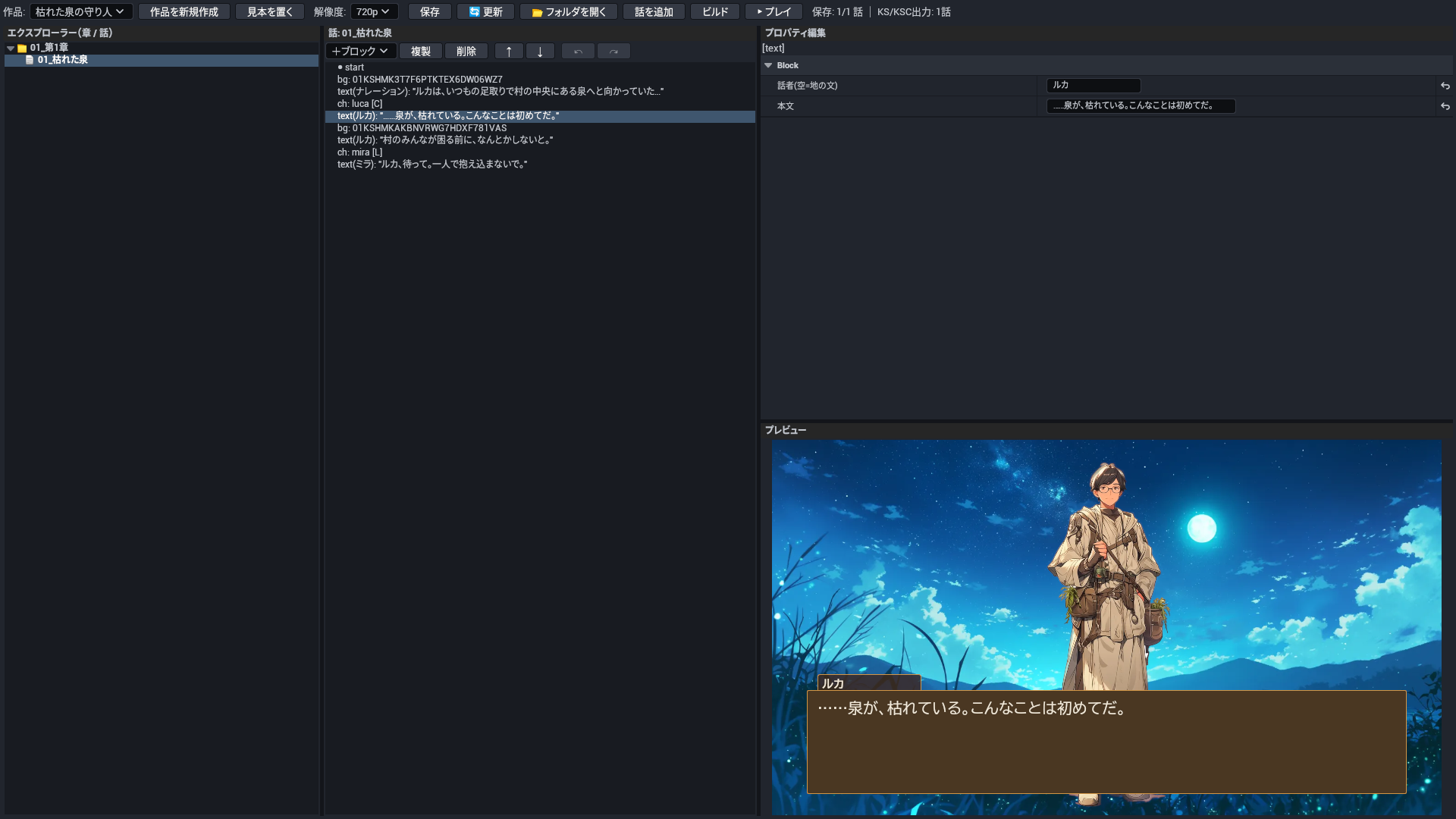
ノベルエディタの 4 つの区画(見本の話の台詞を選んだ所)

2.2 ボタンとキー

ボタン・キー 何をするか
新規 作品を作る(題を入れる)
見本を置く 同梱の見本の作品「枯れた泉の守り人」を作品の置き場へ写して開く。前からあるファイルは上書きしない(assets.json には、まだ無い id だけを足す)
+ブロック 選んだブロックの次にブロックを足す。選んだのが if・choice・選択肢なら、その中に足す
複製・削除・↑・↓ ブロックを写す・消す・並べ替える
↶・↷(Ctrl+Z・Ctrl+Y) 元に戻す・やり直す。履歴は話ごとで、別の話を開くと消える
保存(Ctrl+S) 話を保存する。同じフォルダに、同じ中身の KS 台本(.ks)と KSC(.ksc)も書く
ビルド 作品全部(章の順 → 話の順)を works/<作品の id>/scenario.json に組み、検査(§6.1)を回す
▶ プレイ ビルドしてから PIE で遊ぶ。マップは設定の PreviewMap(空なら今開いているマップ)

ビルドの検査の指摘は下の一覧に出ます。行を押すと、その話を開いてそのブロックを選びます。

3. ブロック

ノベルエディタの +ブロック で置けるブロックと、その欄です。option(選択肢)は choice の中にだけ置けます。

text(テキスト)

台詞か地の文を 1 つ出し、クリックを待つ。

欄(エディタの名前) 鍵 何を書くか
話者(空=地の文) speaker 話者の名前。空なら地の文。
本文 body 本文(複数行も可)。空だとビルドの検査が指摘する。

出る Op: TEXT_APPEND・WAIT_CLICK

bg(背景)

背景を替える。

欄(エディタの名前) 鍵 何を書くか
背景アセット assetId 背景の素材。assets.json の背景から選ぶ。

出る Op: BG_SET

ch(立ち絵)

立ち絵を出す、または消す。

欄(エディタの名前) 鍵 何を書くか
立ち絵アセット charAssetId 立ち絵の素材。assets.json の立ち絵から選ぶ。
位置(L/C/R) pos 立ち位置。L・C・R。
表示 visible 入れれば出す・外せば消す。

出る Op: CH_HIDE・CH_SET

set_var(変数設定)

変数に入れる・足す・引く。

欄(エディタの名前) 鍵 何を書くか
変数名 varName 変数の名前。
演算子(=,+,-) operator =(入れる)・+(足す)・-(引く)。
値 value 値。

出る Op: VAR_ADD・VAR_SUB・VAR_SET

jump(ジャンプ)

別の話へ飛ぶ。

欄(エディタの名前) 鍵 何を書くか
遷移先ページID toPageId 飛び先の話の id。

出る Op: JUMP

if(条件分岐)

条件で分ける。中に「合うとき」と「合わないとき」のブロックを置く。

欄(エディタの名前) 鍵 何を書くか
条件式 condition 条件の式(KS の if と同じ書き方。§4.1)。

出る Op: JUMP_IF・JUMP

choice

選択肢を出す。中に「選択肢」を置き、それぞれの中に選んだ後のブロックを置く。

欄なし。

出る Op: CHOICE・JUMP

option(選択肢)

選択肢 1 つ(choice の中にだけ置ける)。

欄(エディタの名前) 鍵 何を書くか
選択肢テキスト text ボタンに出る文。空だとビルドの検査が指摘する。

4. KS 台本

KS 台本は 1 話 1 ファイルの文字の台本です。ノベルエディタで保存すると、ブロックから同じ中身の .ks が書かれます。KS 台本エディタで直接書くこともできます(§5)。

; title: 枯れた泉
*start
@bg forest fade=500
#ナレーション
ルカは、いつもの足取りで村の中央にある泉へと向かっていた。
@l
@ch luca default center
#ルカ
……泉が、枯れている。
@p
@jump next

4.1 行の種類

行の種類 書き方 何をするか
COMMENT ; メモ・// メモ 注釈。ゲームには出ない。先頭の ; title: <題> は話の題になる。
COMMAND @bg forest 命令。@ に命令の名前と引数を続ける(§4.2)。知らない名前はビルドで誤り。
TEXT 泉が、枯れている。 本文。直前の話者の台詞として出る。名前:台詞 のように全角のコロンで話者を書いてもよい。
VAR_SET trust = 1・trust += 1・trust -= 1 変数に入れる・足す・引く。= は数・"文字"・true/false、+=・-= は数だけ。
CHOICE_START choice { 選択肢の始まり。中に選択肢を並べ、} で閉じる。
CHOICE_OPTION "一緒に行く" { 選択肢 1 つ。" で囲んだ文がボタンになり、選ぶと { から } までを行う。if (…) の条件はまだ効かない(警告が出て、いつも出る)。
CHOICE_END } 選択肢・選択肢 1 つ・if の区切りを閉じる。
IF_START if (trust >= 2) { 条件で分ける。条件は 変数(真なら)・変数 == 数(!=・>=・<=・>・<)・&&・||・!・( )。
IF_ELSE } else { 条件に合わないときの側。
IF_END } if を閉じる(書き方は CHOICE_END と同じ }。どちらを閉じるかは中身で決まる)。
LABEL *start ラベル。@jump・@call の飛び先。名前は話(ファイル)ごとに分けられ、別の話からも飛べる。
SPEAKER #ルカ・# 話者。続く本文がこの名前の台詞になる。# だけの行で話者を外す(地の文)。

4.2 命令

@ で始まる行です。ここに載せたのは、UE のゲームで絵・文字・流れに効く命令だけです。例の next はラベル *next の名前です。

UE で効く命令は 39 個(別名 2 個を除く)。

命令 何をするか 出る Op
@bg 背景を替える。 BG_SET・BG_CLEAR
@ch 立ち絵を出す。 CH_SET
@ch_hide 立ち絵を 1 人消す。 CH_HIDE
@ch_clear 立ち絵を全部消す。 CH_CLEAR
@ch_expr 出ている立ち絵の表情(ポーズ)だけを替える。 CH_EXPR
@ch_move 出ている立ち絵を別の立ち位置へ動かす。 CH_MOVE
@text_clear 表示中の本文を消す。 TEXT_CLEAR
@sprite 絵(スプライト)を 1 枚、決めた位置に出す。 SPRITE_SET
@sprite_move 出ているスプライトを動かす・透かす・拡大する。 SPRITE_MOVE
@sprite_hide スプライトを 1 枚消す。 SPRITE_HIDE
@sprite_clear スプライトを全部(または片方のレイヤだけ)消す。 SPRITE_CLEAR
@text メッセージ枠の外の、決めた位置に文字を出す(場所の名前・日付など)。 TEXT_SPRITE_SET
@ui_show MomijiUI の画面(作品の ui/<id>.json)を出す。 UI_SHOW
@ui_hide @ui_show で出した画面を閉じる。 UI_HIDE
@layer 背景・立ち絵・重ね絵のレイヤを、まとめて隠す・透かす。 LAYER_SET
@transition レイヤの切り替えの溶けこみを始める。 TRANSITION
@wait_transition @transition が終わるまで待つ。 WAIT_TRANSITION
@mask 画面全体を 1 色で覆う(暗転の幕など)。 MASK_SET
@mask_clear @mask の幕を外す。 MASK_CLEAR
@wait_camera @camera の動きが終わるまで待つ。 WAIT_CAMERA
@wait 決めた時間だけ待つ(クリックでは飛ばせない)。 WAIT_MS
@timeline_play タイムライン(複数の動きを時間に沿って並べた演出)を再生し、終わるまで待つ。 TIMELINE_PLAY
@filter(別名 @screenFilter) 画面全体に色のフィルタをかける。 SCREEN_FILTER
@filter_clear(別名 @screenFilterClear) 画面のフィルタを外す。 SCREEN_FILTER_CLEAR
@shake 画面を揺らす。 SHAKE
@flash 画面を一瞬白く光らせる。 FLASH
@fade_black 画面を黒へ暗くする(暗転)。 FADE_BLACK
@fade_white 画面を白へ飛ばす。 FADE_WHITE
@black_in 黒い画面から絵へ明ける。 BLACK_IN
@white_in 白い画面から絵へ戻す。 WHITE_IN
@overlay 画面の前に絵を重ねる(雨・霧・枠など)。 OVERLAY_SET
@overlay_hide 重ねた絵を消す。 OVERLAY_HIDE
@camera 画面のカメラを動かす(寄る・ずらす)。 CAMERA_SET
@call ラベルへ飛び、そこで @return に来たら、この行の次へ戻る(サブルーチン)。 CALL
@return @call で来た所へ戻る。 RETURN
@jump ラベルへ飛ぶ。 JUMP
@l クリックを待つ(本文は消さない)。 WAIT_CLICK
@p クリックを待ち、本文を消して次のページにする。 PAGE
@r 本文を改行する。 TEXT_NL

@bg

背景を替える。id を書かない @bg だけの行は、背景を消す(BG_CLEAR)。

書き方: @bg <id> [fade=<ms>|slide_left=<ms>|slide_right=<ms>] [x=<n>] [y=<n>] [s=<scale>]

引数 UE で 何を書くか
id 効く 背景の素材の id(assets.json の鍵)。
fade 効く 前の背景から溶けるように替える時間(ミリ秒)。
slide_left 効かない 左へ滑らせて替える。UE では滑らず、書いた時間(ミリ秒)の溶けこみになる。
slide_right 効かない 右へ滑らせて替える。UE では滑らず、書いた時間(ミリ秒)の溶けこみになる。
x 効かない 横にずらす量。UE では効かない。
y 効かない 縦にずらす量。UE では効かない。
s 効かない 拡大率。UE では効かない。

例:

@bg forest fade=500
@bg

出る Op: BG_SET・BG_CLEAR

@ch

立ち絵を出す。同じ名前の立ち絵が出ていれば、ポーズと位置を差し替える。

書き方: @ch <name> <pose> <pos> [fade=<ms>] [x=<n>] [y=<n>] [s=<scale>]

引数 UE で 何を書くか
name 効く 立ち絵の素材の id(assets.json の鍵)。
pose 効く ポーズの名前(見本では default)。
pos 効く 立ち位置。left・center・right(1 文字の L・C・R も可)。
fade 効く 現れる時間(ミリ秒)。
x 効かない 横にずらす量。UE では効かない(立ち位置で決まる)。
y 効かない 縦にずらす量。UE では効かない。
s 効かない 拡大率。UE では効かない。

例:

@ch luca default center fade=300

出る Op: CH_SET

@ch_hide

立ち絵を 1 人消す。

書き方: @ch_hide <name> [fade=<ms>]

引数 UE で 何を書くか
name 効く 消す立ち絵の id。
fade 効かない 消える時間。UE では効かない(すぐ消える)。

例:

@ch_hide luca fade=300

出る Op: CH_HIDE

@ch_clear

立ち絵を全部消す。

書き方: @ch_clear [fade=<ms>]

引数 UE で 何を書くか
fade 効かない 消える時間。UE では効かない(すぐ消える)。

例:

@ch_clear fade=300

出る Op: CH_CLEAR

@ch_expr

出ている立ち絵の表情(ポーズ)だけを替える。位置はそのまま。

書き方: @ch_expr <name> <expression> [fade=<ms>]

引数 UE で 何を書くか
name 効く 立ち絵の id。
expression 効く 新しい表情(ポーズ)の名前。
fade 効く 切り替わる時間(ミリ秒)。

例:

@ch_expr luca default fade=200

出る Op: CH_EXPR

@ch_move

出ている立ち絵を別の立ち位置へ動かす。動いている間も本文は進められる。

書き方: @ch_move <name> <pos> [<ms>|time=<ms>]

引数 UE で 何を書くか
name 効く 立ち絵の id。
pos 効く 行き先。left・center・right(L・C・R も可)。
ms 効く 動く時間(ミリ秒)。書かなければ 500。
time 効く 動く時間(ミリ秒)。<ms> と同じ。

例:

@ch_move luca left time=500

出る Op: CH_MOVE

@text_clear

表示中の本文を消す。クリックは待たない(@p と違い、すぐ次の行へ進む)。

書き方: @text_clear [all|current|target=all|target=current]

引数 UE で 何を書くか
all 効く 本文と、まだ表示していない本文の続きも消す(既定)。
current 効く 表示中の本文だけを消す。
target 効く all か current を target= で書く形。

例:

@text_clear all

出る Op: TEXT_CLEAR

@sprite

絵(スプライト)を 1 枚、決めた位置に出す。看板・小物・図などに使う。

書き方: @sprite <id> <storage> [layer=front|back] [x=<n>] [y=<n>] [opacity=<0-1>] [fade=<ms>]

引数 UE で 何を書くか
id 効く このスプライトの名前(@sprite_move・@sprite_hide で指す)。
storage 効く 絵の素材の id(assets.json の鍵)。
layer 効く front(立ち絵の前)か back(立ち絵の後ろ)。既定 front。
x 効く 左からの位置(論理ピクセル)。
y 効く 上からの位置(論理ピクセル)。
opacity 効く 不透明度(0〜1)。既定 1。
fade 効く 現れる時間(ミリ秒)。

例:

@sprite sign 01KSHMK3T7F6PTKTEX6DW06WZ7 layer=front x=100 y=80 fade=300

出る Op: SPRITE_SET

@sprite_move

出ているスプライトを動かす・透かす・拡大する。書かない引数は今の値のまま。

書き方: @sprite_move <id> [x=<n>] [y=<n>] [opacity=<0-1>] [scale=<scale>] [time=<ms>]

引数 UE で 何を書くか
id 効く @sprite で付けた名前。
x 効く 行き先の横の位置(論理ピクセル)。
y 効く 行き先の縦の位置(論理ピクセル)。
opacity 効く 行き先の不透明度(0〜1)。
scale 効く 行き先の拡大率。
time 効く 動く時間(ミリ秒)。

例:

@sprite_move sign x=400 time=500

出る Op: SPRITE_MOVE

@sprite_hide

スプライトを 1 枚消す。

書き方: @sprite_hide <id> [fade=<ms>]

引数 UE で 何を書くか
id 効く @sprite で付けた名前。
fade 効く 消える時間(ミリ秒)。

例:

@sprite_hide sign fade=300

出る Op: SPRITE_HIDE

@sprite_clear

スプライトを全部(または片方のレイヤだけ)消す。

書き方: @sprite_clear [layer=front|back] [fade=<ms>]

引数 UE で 何を書くか
layer 効く 消すレイヤ。書かなければ両方。
fade 効く 消える時間(ミリ秒)。

例:

@sprite_clear fade=300

出る Op: SPRITE_CLEAR

@text

メッセージ枠の外の、決めた位置に文字を出す(場所の名前・日付など)。

書き方: @text <id> "<text>" [x=<n>] [y=<n>] [size=<n>] [color=#rrggbb] [bold=true] [layer=front|back] [fade=<ms>]

引数 UE で 何を書くか
id 効く この文字の名前(同じ名前で出し直すと置き換わる。@sprite_hide で消せる)。
text 効く 出す文字。" で囲む。\n で改行。
x 効く 左からの位置(論理ピクセル)。
y 効く 上からの位置(論理ピクセル)。
size 効く 文字の大きさ。既定 24。
color 効く 文字の色(#rrggbb)。
bold 効く true で太字。
layer 効く front か back。既定 front。
fade 効く 現れる時間(ミリ秒)。

例:

@text place "Chapter 1" x=40 y=40 size=32 color=#ffffff

出る Op: TEXT_SPRITE_SET

@ui_show

MomijiUI の画面(作品の ui/<id>.json)を出す。

書き方: @ui_show <screenId> [wait=true]

引数 UE で 何を書くか
screenId 効く 画面の名前(ui/ の中のファイル名から .json を除いたもの)。
wait 効く true で、画面が閉じる(ボタンが押される)まで台本を止める。書かなければ止めずに進む。

例:

@ui_show menu wait=true

出る Op: UI_SHOW

@ui_hide

@ui_show で出した画面を閉じる。

書き方: @ui_hide

引数なし。

例:

@ui_hide

出る Op: UI_HIDE

@layer

背景・立ち絵・重ね絵のレイヤを、まとめて隠す・透かす。

書き方: @layer name=<layer> [visible=true|false] [opacity=<0-1>]

引数 UE で 何を書くか
name 効く background(bg)・character(ch)・overlay(front・sprite)。ほかの名前は何もしない。
visible 効く false で隠す・true で出す。
opacity 効く レイヤの不透明度(0〜1)。

例:

@layer name=character visible=false

出る Op: LAYER_SET

@transition

レイヤの切り替えの溶けこみを始める。待たずに次へ進むので、終わりを待つには @wait_transition を続ける。

書き方: @transition [target=<layer>] [type=fade] [time=<ms>]

引数 UE で 何を書くか
target 効く 対象のレイヤ(@layer の name と同じ名前)。既定 overlay。
type 効かない 種類。UE では効かない(いつも溶けこみ)。
time 効く かかる時間(ミリ秒)。

例:

@transition target=background type=fade time=800

出る Op: TRANSITION

@wait_transition

@transition が終わるまで待つ。

書き方: @wait_transition [target=<layer>]

引数 UE で 何を書くか
target 効く 待つレイヤ。書かなければ、いちばん新しい切り替え。

例:

@wait_transition target=background

出る Op: WAIT_TRANSITION

@mask

画面全体を 1 色で覆う(暗転の幕など)。

書き方: @mask [color=#rrggbb] [opacity=<0-1>] [time=<ms>]

引数 UE で 何を書くか
color 効く 幕の色。既定は黒(#000000)。
opacity 効く 幕の不透明度(0〜1)。既定 1。
time 効く 幕が下りる時間(ミリ秒)。

例:

@mask color=#000000 opacity=1 time=500

出る Op: MASK_SET

@mask_clear

@mask の幕を外す。

書き方: @mask_clear [time=<ms>]

引数 UE で 何を書くか
time 効く 幕が上がる時間(ミリ秒)。

例:

@mask_clear time=500

出る Op: MASK_CLEAR

@wait_camera

@camera の動きが終わるまで待つ。

書き方: @wait_camera

引数なし。

例:

@wait_camera

出る Op: WAIT_CAMERA

@wait

決めた時間だけ待つ(クリックでは飛ばせない)。

書き方: @wait <sec>

引数 UE で 何を書くか
sec 効く 待つ秒数(小数も可。sec=1.5 の形でもよい)。

例:

@wait 1.5

出る Op: WAIT_MS

@timeline_play

タイムライン(複数の動きを時間に沿って並べた演出)を再生し、終わるまで待つ。scenario.json と同じフォルダの timelines.json から id で引く。無い id は何もせず先へ進む。

書き方: @timeline_play <timelineId>

引数 UE で 何を書くか
timelineId 効く タイムラインの id。
id 効く id=<timelineId> の形でも書ける。

例:

@timeline_play opening

出る Op: TIMELINE_PLAY

@filter

画面全体に色のフィルタをかける。UE で効く名前は grayscale(mono)・sepia・warm(morning)・cool(night)。

別名: @screenFilter(同じ働き)。

書き方: @filter <type> [<intensity>]

引数 UE で 何を書くか
type 効く フィルタの名前(上の 4 つ)。sepia=0.7 のように強さを = で付けてもよい。
intensity 効く 強さ(0〜1)。既定 1。
tiling 効かない 絵を敷き詰めるフィルタ用の印。UE では効かない(key=値 の追加の項目も、UE では使わない)。

例:

@filter sepia 0.8

出る Op: SCREEN_FILTER

@filter_clear

画面のフィルタを外す。

別名: @screenFilterClear(同じ働き)。

書き方: @filter_clear

引数なし。

例:

@filter_clear

出る Op: SCREEN_FILTER_CLEAR

@shake

画面を揺らす。揺れ終わるまで待つ。

書き方: @shake [<intensity>] [<duration>]

引数 UE で 何を書くか
intensity 効く 揺れの幅(論理ピクセル・整数)。既定 5。intensity=8 の形でもよい。
duration 効く 揺れる時間(ミリ秒)。既定 300。duration=400 の形でもよい。

例:

@shake 8 400

出る Op: SHAKE

@flash

画面を一瞬白く光らせる。終わるまで待つ。

書き方: @flash [<duration>]

引数 UE で 何を書くか
duration 効く 光る時間(ミリ秒)。既定 200。duration= の形でもよい。

例:

@flash 200

出る Op: FLASH

@fade_black

画面を黒へ暗くする(暗転)。終わるまで待つ。戻すのは @black_in。

書き方: @fade_black [<duration>]

引数 UE で 何を書くか
duration 効く 暗くなる時間(ミリ秒)。既定 500。

例:

@fade_black 500

出る Op: FADE_BLACK

@fade_white

画面を白へ飛ばす。終わるまで待つ。戻すのは @white_in。

書き方: @fade_white [<duration>]

引数 UE で 何を書くか
duration 効く 白くなる時間(ミリ秒)。既定 500。

例:

@fade_white 500

出る Op: FADE_WHITE

@black_in

黒い画面から絵へ明ける。終わるまで待つ。

書き方: @black_in [<duration>]

引数 UE で 何を書くか
duration 効く 明ける時間(ミリ秒)。既定 500。

例:

@black_in 500

出る Op: BLACK_IN

@white_in

白い画面から絵へ戻す。終わるまで待つ。

書き方: @white_in [<duration>]

引数 UE で 何を書くか
duration 効く 戻る時間(ミリ秒)。既定 500。

例:

@white_in 500

出る Op: WHITE_IN

@overlay

画面の前に絵を重ねる(雨・霧・枠など)。同じ id を出し直すと、位置と倍率を差し替える。

書き方: @overlay <id> [fade=<ms>] [x=<n>] [y=<n>] [s=<scale>]

引数 UE で 何を書くか
id 効く 重ねる絵の素材の id(assets.json の鍵)。
fade 効く 現れる時間(ミリ秒)。
x 効く 横にずらす量(論理ピクセル)。
y 効く 縦にずらす量(論理ピクセル)。
s 効く 拡大率(1 が等倍)。

例:

@overlay rain fade=300

出る Op: OVERLAY_SET

@overlay_hide

重ねた絵を消す。id を書かなければ全部。

書き方: @overlay_hide [<id>] [fade=<ms>]

引数 UE で 何を書くか
id 効く 消す絵の id。
fade 効く 消える時間(ミリ秒)。

例:

@overlay_hide rain fade=300

出る Op: OVERLAY_HIDE

@camera

画面のカメラを動かす(寄る・ずらす)。待たずに次へ進むので、終わりを待つには @wait_camera を続ける。

書き方: @camera [x=<n>] [y=<n>] [zoom=<scale>] [time=<ms>] [reset]

引数 UE で 何を書くか
x 効く 横の位置(論理ピクセル)。書かなければ今のまま。
y 効く 縦の位置(論理ピクセル)。書かなければ今のまま。
zoom 効く 寄りの倍率(1 が等倍)。
time 効く 動く時間(ミリ秒)。
reset 効く 初めの位置と倍率へ戻す(ほかの引数より先に効く)。
pivotX 効かない 寄るときの中心の横の位置。UE では効かない。
pivotY 効かない 寄るときの中心の縦の位置。UE では効かない。
easing 効かない 動きの緩急の名前。UE では効かない(一定の動き)。
shake 効かない カメラの揺れ。UE では効かない(揺らすのは @shake)。

例:

@camera zoom=1.5 x=100 y=0 time=800

出る Op: CAMERA_SET

@call

ラベルへ飛び、そこで @return に来たら、この行の次へ戻る(サブルーチン)。

書き方: @call <label>

引数 UE で 何を書くか
label 効く 飛び先のラベルの名前(* を付けない)。

例:

@call next

出る Op: CALL

@return

@call で来た所へ戻る。@call で来ていなければ台本を終える。

書き方: @return

引数なし。

例:

@return

出る Op: RETURN

@jump

ラベルへ飛ぶ。別の話(別のファイル)のラベルへも飛べる。

書き方: @jump <label>

引数 UE で 何を書くか
label 効く 飛び先のラベルの名前(* を付けない)。

例:

@jump next

出る Op: JUMP

@l

クリックを待つ(本文は消さない)。本文の行の終わりに @l と続けて書くこともできる。

書き方: @l

引数なし。

例:

@l

出る Op: WAIT_CLICK

@p

クリックを待ち、本文を消して次のページにする。

書き方: @p

引数なし。

例:

@p

出る Op: PAGE

@r

本文を改行する。

書き方: @r

引数なし。

例:

@r

出る Op: TEXT_NL

4.3 UE ではまだ動かない命令

次の命令は、台本に書けばビルドは通りますが、UE のゲームでは何も起きません(Live2D・VRM・粒子・RPG のマップなど、ほかの再生のための命令と、まだ UE で音を鳴らしていない音の命令)。UE の再生がこれを読み飛ばしても、台本はそのまま先へ進みます。

37 個。台本に書いてもコンパイルは通るが、UE のゲームでは何も起きない。

命令 出る Op UE での扱い 元の用途
@ch_anim CH_ANIM UE の再生が受け取って何もしない 立ち絵の連番の絵を動かす(旧ブラウザ版の機能)。
@ch_lip CH_LIP UE の再生が知らない Op(読み飛ばす) 口の動き(口パク)を切り替える(Live2D・VRM 用)。
@ch_motion CH_MOTION UE の再生が知らない Op(読み飛ばす) 立ち絵のモデルにモーションをさせる(Live2D・VRM 用)。
@ch_param CH_PARAM UE の再生が知らない Op(読み飛ばす) 立ち絵のモデルの値を 1 つ動かす(Live2D 用)。
@ch_state CH_STATE UE の再生が知らない Op(読み飛ばす) 立ち絵の重ねた部品の状態を替える(目・口などの差分用)。
@live2d LIVE2D_SET UE の再生が受け取って何もしない Live2D のモデルを出す。
@live2d_hide LIVE2D_HIDE UE の再生が受け取って何もしない Live2D のモデルを消す。
@live2d_motion LIVE2D_MOTION UE の再生が受け取って何もしない Live2D のモデルにモーションをさせる。
@live2d_expression LIVE2D_EXPRESSION UE の再生が受け取って何もしない Live2D のモデルの表情を替える。
@particle PARTICLE_EMIT UE の再生が受け取って何もしない 粒子の演出(花びら・火の粉など)を出す。
@particle_stop PARTICLE_STOP UE の再生が受け取って何もしない 粒子の演出を止める。
@effect EFFECT_PLAY UE の再生が知らない Op(読み飛ばす) 演出の定義ファイル(effect.json)を再生する。
@slash SLASH_EMIT UE の再生が知らない Op(読み飛ばす) 斬撃の軌跡を描く演出。
@color_adjust COLOR_ADJUST UE の再生が受け取って何もしない 画面の明るさ・コントラスト・彩度・色温度を変える。
@bgm BGM_PLAY UE の再生は名前や色を覚える(セーブに入る)だけで、音も絵も出ない BGM を流す。
@bgm_stop BGM_STOP UE の再生は名前や色を覚える(セーブに入る)だけで、音も絵も出ない BGM を止める。
@se SE_PLAY UE の再生の受け口の中身が空(何もしない) 効果音を鳴らす。
@se_stop SE_STOP UE の再生に受け口が無い(既定の空のまま) 効果音を止める。
@voice VOICE_PLAY UE の再生の受け口の中身が空(何もしない) 声を鳴らす。
@wait_voice_end WAIT_VOICE_END UE の再生が受け取って何もしない 声が鳴り終わるまで待つ。
@battle BATTLE_START UE の再生に処理が無い(読み飛ばす) 戦闘を始める(RPG 用。KaedeRPG の物語の話が使う)。
@filter_mix FILTER_MIX UE の再生に処理が無い(読み飛ばす) フィルタを重ねてかける。
@map_load MAP_LOAD UE の再生が受け取って何もしない マップを開く(RPG 用)。
@map_exit MAP_EXIT UE の再生が受け取って何もしない マップを出る(RPG 用)。
@player_move PLAYER_MOVE UE の再生が受け取って何もしない 主人公を歩かせる(RPG 用)。
@event_move EVENT_MOVE UE の再生が受け取って何もしない マップの上のイベントを動かす(RPG 用)。
@item_add ITEM_ADD UE の再生が受け取って何もしない 持ち物を増やす(RPG 用)。
@item_remove ITEM_REMOVE UE の再生が受け取って何もしない 持ち物を減らす(RPG 用)。
@layout_set LAYOUT_SET UE の再生が受け取って何もしない 画面の配置を切り替える(旧ブラウザ版の機能)。
@call_template CALL_TEMPLATE UE の再生が受け取って何もしない 共通の場面(テンプレート)を呼ぶ(旧ブラウザ版の機能)。
@scroll_text SCROLL_TEXT UE の再生が受け取って何もしない 文字を下から上へ流す(スタッフロールなど)。
@sceneMode SCENE_MODE UE の再生に受け口が無い(既定の空のまま) 2D と 3D モデル(VRM)の表示を切り替える。
@text_style TEXT_STYLE UE の再生は名前や色を覚える(セーブに入る)だけで、音も絵も出ない メッセージ枠と名前枠の色を替える。
@vrmShow VRM_SHOW UE の再生に受け口が無い(既定の空のまま) VRM の 3D モデルを出す。
@vrmHide VRM_HIDE UE の再生に受け口が無い(既定の空のまま) VRM のモデルを消す。
@vrmExpression VRM_EXPRESSION UE の再生に受け口が無い(既定の空のまま) VRM のモデルの表情を替える。
@vrmPose VRM_POSE UE の再生に受け口が無い(既定の空のまま) VRM のモデルの姿勢を替える。

4.4 KSC

.ksc の中で呼べる関数のうち、UE の再生が受け取るものです。ここに無い関数は、UE では呼んでも何もせずに先へ進みます。

35 個(うち 5 個は UE では何も出ない)。

関数 引数 待つか UE で 何をするか
showDialogue speaker, lines 待つ 効く 台詞を出し、クリックを待つ。lines の各行を改行でつないで出す。
setBg name, effect 待つ 効く 背景を替える。effect に fade・slide_left・slide_right のどれかを書くと 0.5 秒で替わる(UE ではどれも溶けこみ)。
showChar name, pose, position, fadeMs 待つ 効く 立ち絵を出す(@ch と同じ)。
showCharAnim name, pose, position 待つ 効く UE では動く絵にならず、showChar と同じ止まった立ち絵になる。
hideChar name, fadeMs 待つ 効く 立ち絵を 1 人消す。
clearChars fadeMs 待つ 効く 立ち絵を全部消す。
moveChar name, position, time 待つ 効く 立ち絵を動かす(@ch_move と同じ。待たない)。
playBgm name, vol, fadeMs すぐ 何も出ない BGM を流す。UE ではいまは曲の名前を覚えるだけで、鳴らない。
stopBgm — すぐ 何も出ない BGM を止める(UE では覚えた曲の名前を消すだけ)。
fadeBgm time 待つ 何も出ない BGM を消していく(UE では stopBgm と同じ)。
playSe name, vol すぐ 何も出ない 効果音を鳴らす。UE ではいまは何もしない。
playVoice name すぐ 何も出ない 声を鳴らす。UE ではいまは何もしない。
showChoice options 待つ 効く 選択肢を出し、選んだ番号(0 から)を返す。
waitForClick — 待つ 効く クリックを待つ。
wait ms 待つ 効く 決めた時間(ミリ秒)だけ待つ。
setFlag key, val すぐ 効く 旗(名前つきの値)を立てる。
getFlag key すぐ 効く 旗の値を返す。無ければ空。
giveItem id, n すぐ 効く 持ち物の数を増やす(台本の中だけの数え)。
takeItem id, n すぐ 効く 持ち物の数を減らす。足りなければ減らさず false を返す。
hasItem id すぐ 効く 持ち物が 1 つ以上あれば true。
screenFilter type, intensity すぐ 効く 画面のフィルタをかける(@filter と同じ)。
filter type, intensity すぐ 効く screenFilter の別名。
screenFilterClear — すぐ 効く 画面のフィルタを外す。
filter_clear — すぐ 効く screenFilterClear の別名。
shake intensity, durationMs 待つ 効く 画面を揺らし、終わるまで待つ。
floor x すぐ 効く 小数を切り下げる。
ceil x すぐ 効く 小数を切り上げる。
round x すぐ 効く 四捨五入する。
trunc x すぐ 効く 小数の部分を捨てる。
abs x すぐ 効く 絶対値。
sign x すぐ 効く 正なら 1・0 なら 0・負なら -1。
sqrt x すぐ 効く 平方根。
min a, b すぐ 効く 小さいほう。
max a, b すぐ 効く 大きいほう。
clamp x, lo, hi すぐ 効く lo 以上 hi 以下に収める。

5. KS 台本エディタ

5.1 画面

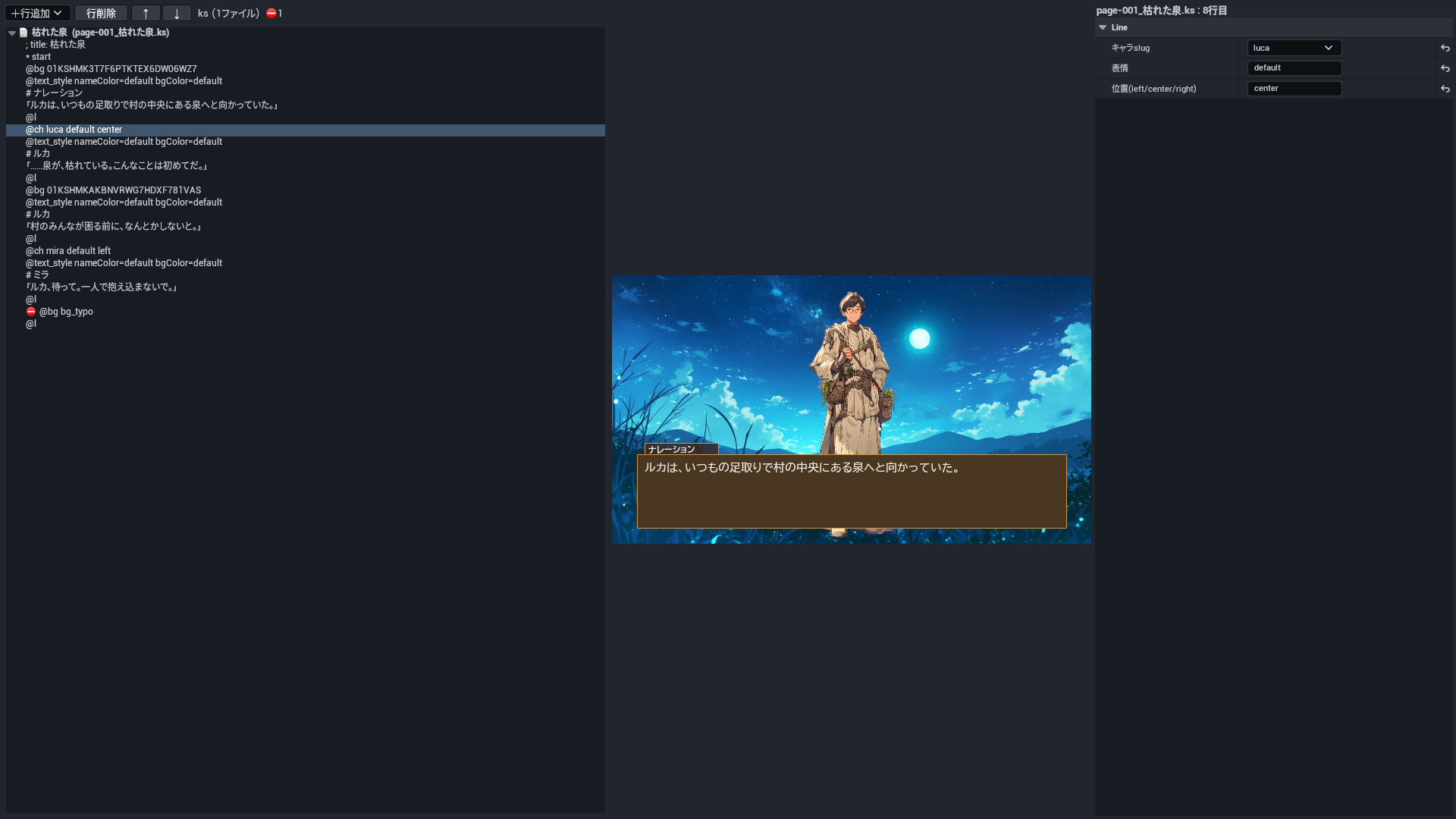
KS 台本エディタは、台本の行を木で見せ、選んだ行の欄・プレビュー・検査(§6.2)を並べる画面です。

KS 台本エディタ。左が台本の木(足した無い絵の行  に付いた検査の印は例)・中がプレビュー・右が選んだ行の欄

5.2 専用の欄のあるタグ

タグ 欄(エディタの名前) 何を書くか
@bg 背景slug 背景(@bg)。素材の候補から選べる。
@ch キャラslug・表情・位置(left/center/right) 立ち絵(@ch)。キャラ・表情・位置。
@jump ジャンプ先 ジャンプ(@jump)の飛び先。
@sprite_clear レイヤ(空=全部)・フェードms スプライトを全部消す(@sprite_clear)。レイヤとフェード。
@text_clear 対象(all/current) 本文を消す(@text_clear)。対象。
@ch_expr キャラslug・表情・フェードms 表情の差し替え(@ch_expr)。キャラ・表情・フェード。
@text id・本文・X・Y・文字サイズ・色(#rrggbb)・太字(true/空)・レイヤ(front/back)・フェードms 決めた位置の文字(@text)。id・本文・位置・大きさ・色・太字・レイヤ・フェード。
@sprite id(move/hideの対象名)・画像slug・レイヤ(front/back)・X・Y・不透明度(0..1)・フェードms スプライト(@sprite)。id・絵・レイヤ・位置・不透明度・フェード。
@sprite_move id・X(空=現在値)・Y(空=現在値)・不透明度(0..1)・拡大率・所要ms スプライトを動かす(@sprite_move)。空の欄は今の値のまま。
@sprite_hide id・フェードms スプライトを消す(@sprite_hide)。
@timeline_play タイムラインid タイムラインの再生(@timeline_play)。
@wait 待ち時間ms 待つ(@wait)。欄はミリ秒で、行には秒で書かれる。
@ch_hide キャラslug・フェードms 立ち絵を消す(@ch_hide)。
@ch_move キャラslug・位置(left/center/right)・所要ms 立ち絵を動かす(@ch_move)。
@mask 色(#rrggbb)・不透明度(0..1)・所要ms 幕(@mask)。色・不透明度・時間。
@mask_clear 所要ms 幕を外す(@mask_clear)。
@transition 対象レイヤ・種類(fade)・所要ms 切り替えの溶けこみ(@transition)。
@layer レイヤ名(background/character/overlay)・表示(true/false)・不透明度(0..1) レイヤを隠す・透かす(@layer)。
@se SE slug 効果音(@se)。UE ではまだ鳴らない(§4.3)。
@call 呼び出し先 サブルーチンの呼び出し(@call)の飛び先。
@ch_clear フェードms 立ち絵を全部消す(@ch_clear)。
@wait_transition 対象レイヤ(空=直近) 切り替えの終わりを待つ(@wait_transition)。
@shake 強さ(論理px)・所要ms 画面を揺らす(@shake)。強さと時間。

6. 検査

6.1 ビルドの検査

ノベルエディタのビルドが見る点です。どれもビルドは止めません(組めて、遊ぶとおかしくなる所を知らせます)。素材が見つからない検査は、作品の assets.json を読めたときだけ働きます。
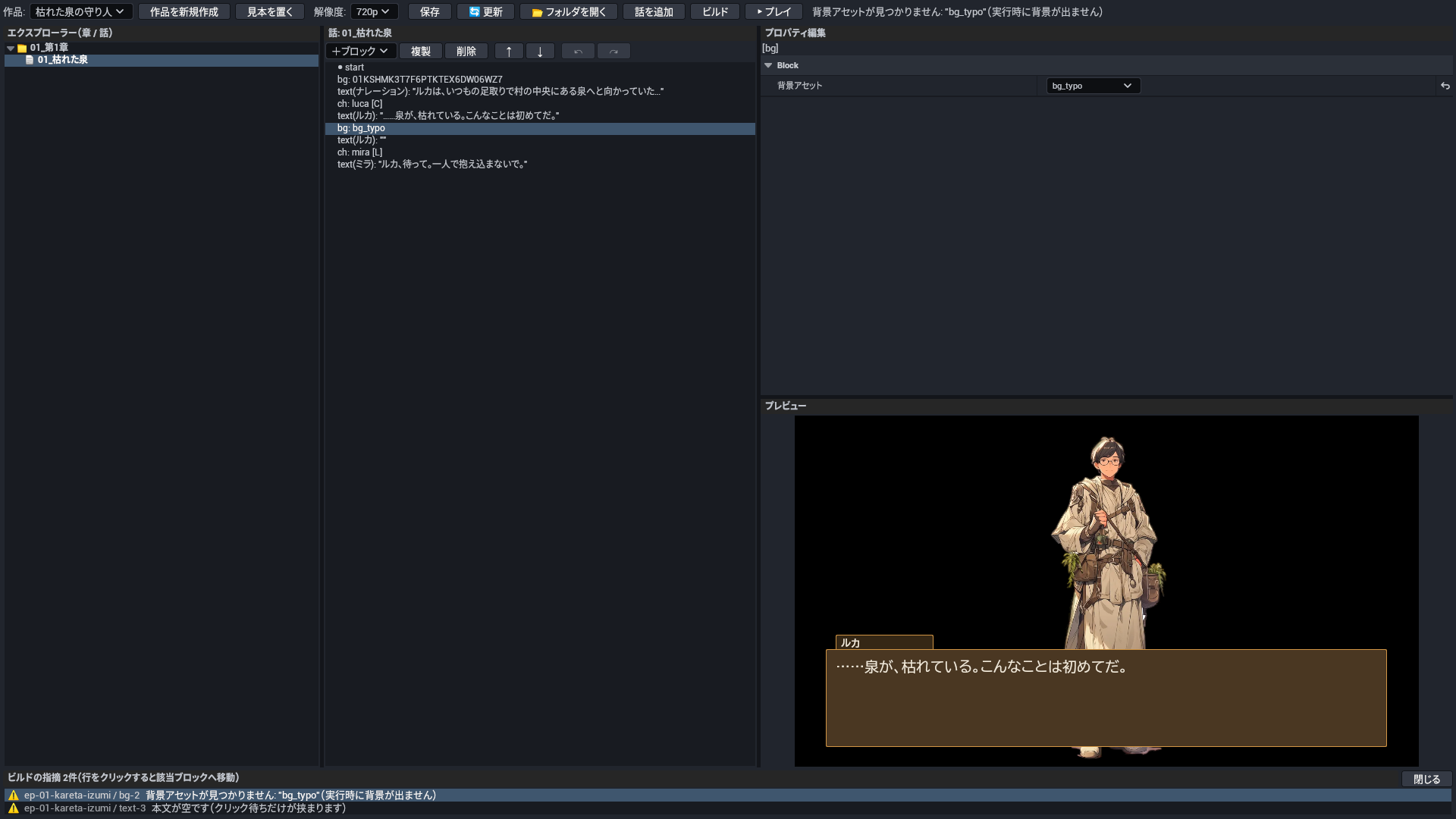
ビルドの指摘の一覧(見本の写しに誤りを 2 つ入れてビルドし、1 つ目の指摘を押した所)

15 種。

出る文 意味と直し方
話/ページ id が重複しています: "<名前>"(jump は最初の1つにしか飛べません) 2 つの話が同じ id を持っている。jump は最初の話にしか着かない。片方の話の id を替える。
jump 先の話が見つかりません: "<名前>"(シナリオ終端へ解決されます) ジャンプ先の話が無い。遊ぶとそこで終わる。ジャンプの「遷移先ページID」を、ある話の id に直す。
内部ラベル未解決: <名前>(コンパイラ不具合の可能性) エディタの中で作る飛び先が見つからない(エディタの不具合の疑い)。話を保存し直してもう一度ビルドし、残れば不具合として知らせる。
ブロックid が重複しています: "<名前>" 2 つのブロックが同じ id を持っている。片方を消して作り直す。
本文が空です(クリック待ちだけが挟まります) テキストのブロックの本文が空。遊ぶと何も出ないままクリックを待つ。本文を書くか、ブロックを消す。
変数名が未指定です(この代入は効きません) 変数設定のブロックに変数の名前が無い。名前を書く。
jump 先が未指定です(シナリオ終端へ飛びます) ジャンプのブロックに飛び先が無い。遊ぶとそこで終わる。飛び先の話を選ぶ。
条件が空です(分岐が意図どおりに働きません) 条件分岐のブロックに条件が無い。条件の式を書く。
選択肢がありません(実行時に進行不能になる可能性) 選択肢のブロックの中に選択肢が 1 つも無い。遊ぶと先へ進めなくなる。選択肢を足す。
選択肢のテキストが空です(選べない選択肢になります) 選択肢の文が空。ボタンに何も出ない。文を書く。
未対応のブロック種別です: "<名前>"(このブロックは出力されません) ノベルエディタが組めない種類のブロックがある(古い作品の効果・画面フィルター・オーバーレイなど)。遊ぶときは飛ばされる。消すか、KS で同じことを書く。
背景アセットが未指定です(背景が変わりません) 背景のブロックで素材が選ばれていない。素材を選ぶ。
背景アセットが見つかりません: "<名前>"(実行時に背景が出ません) 背景の素材の id が assets.json に無い。assets.json に足すか、ある素材を選ぶ。
立ち絵アセットが未指定です 立ち絵のブロックで素材が選ばれていない。素材を選ぶ。
立ち絵アセットが見つかりません: "<名前>"(実行時に立ち絵が出ません) 立ち絵の素材の id が assets.json に無い。assets.json に足すか、ある素材を選ぶ。

6.2 KS の検査

KS 台本エディタが行ごとに付ける印です。エラーはビルドか遊ぶときに壊れる所、警告は画面が崩れる所、情報は誤りではないが気を付ける所です。

8 種。

重さ 出る文 意味と直し方
エラー 未定義のアセットslug: <名前> @bg などの素材の名前が、作品の素材の一覧に無い。名前を直すか素材を足す。
エラー 未定義のキャラslug: <名前> @ch のキャラの名前が素材の一覧に無い。
警告 スロット衝突: <名前> は <名前> が使用中 その立ち位置には別のキャラが出ている。先に消すか別の位置にする。
警告 同時立ち絵が3体を超過(<数>体) 立ち絵が 4 人以上同時に出ている(立ち位置は 3 つ)。
エラー ジャンプ先ファイルが存在しない: <名前> @jump の飛び先のファイルが無い。
エラー ジャンプ先ラベルが <名前> に無い: <名前> 飛び先のファイルにそのラベルが無い。
エラー ファイル内ラベルが無い: <名前> 同じファイルの中にそのラベルが無い。
情報 次ファイルへ立ち絵<数>体を持ち越し(演出継続として合法) 話の終わりで立ち絵が出たまま次の話へ続く。誤りではない(わざとなら直さなくてよい)。

7. 設定

7.1 プロジェクトの設定

Edit → Project Settings → Plugins → KaedeVN。既定はプラグインの Config/DefaultKaedeVN.ini にあり、プロジェクトの Config/DefaultKaedeVN.ini で上書きします。

項目 既定 何を書くか
WorkRoot Game 作品のデータ(works/・ui/・assets.json・台本)の置き場。プロジェクトの直下からの相対(絶対でもよい)。書き出しでは、この置き場を UFS に入れる(§8)。
PreviewMap 空 ノベルエディタの ▶ プレイで開くマップ(例 /Game/Map/MyNovelMap)。空なら今開いているマップで遊ぶ。

7.2 作品のデータの鍵

作品の置き場の中のファイルです(見本の作品から拾った鍵)。ノベルエディタの「解像度」を選ぶと、work.json に画面の大きさ(screen)が書かれ、ビルドで scenario.json に渡ります。

ファイル 鍵 何を書くか
work.json id 作品の id(フォルダ名と同じにする)。
work.json title 作品の題。
work.json chapters 章のフォルダの名前を、並べる順に。
work.json assets 作品だけで使う素材の一覧(見本では空。素材は assets.json に書く)。
work.json schemaVersion 形の版(いまは 2)。手で変えない。
<話>.json id 話の id(ジャンプの飛び先に使う)。
<話>.json name 話の名前(エディタの木に出る)。
<話>.json blocks ブロックの列(§3)。
assets.json <素材の id> 素材の id → 絵のファイルの道(プロジェクトの直下からの相対。例 Game/assets/bg/forest.png)。

7.3 ゲームのコンフィグ画面

見本の作品のコンフィグ画面(ui/config.json)の項目です。画面は MomijiUI の JSON なので、作品ごとに項目を増やし・減らせます。

17 項目。UE のゲームが反映するのは 4 項目で、残りは画面で選べるが UE のゲームは使わない。

項目 タブ 取りうる値 UE が反映するか 何を変えるか
msgSpeed テキスト 0〜1(つまみ) 反映する 文字の出る速さ。
autoSpeed テキスト 0〜1(つまみ) 使わない オートで次へ進むまでの間。
msgWinOpacity テキスト 0〜1(つまみ) 使わない メッセージ枠の濃さ。
skipUnread テキスト 入・切 使わない まだ読んでいない文もスキップするか。
fontSize テキスト 小・中・大(左から 0〜2) 使わない 文字の大きさ。
fontFace テキスト ゴシック・明朝(左から 0〜1) 反映する 書体(ゴシック・明朝)。
masterVol 音声 0〜1(つまみ) 使わない 全体の音量。
bgmVol 音声 0〜1(つまみ) 使わない BGM の音量。
seVol 音声 0〜1(つまみ) 使わない 効果音の音量。
voiceVol 音声 0〜1(つまみ) 使わない 声の音量。
stopVoiceOnAdvance 音声 入・切 使わない 次へ進んだら声を止めるか。
fullscreen 表示 入・切 使わない 全画面にするか。
resolution 表示 720p・900p・1080p(左から 0〜2) 反映する 窓の大きさ。
textArea 表示 標準・広い(左から 0〜1) 使わない 本文の枠の広さ。
autosave システム 入・切 使わない 自動でセーブするか。
lang システム 日本語・English(左から 0〜1) 使わない 画面の言語。
uiTheme システム atelier・midnight・sakura(左から 0〜2) 反映する 画面の配色。

8. 書き出し

9. モジュールとファイル

モジュール 種類 何をするか
KaedeVnCore Runtime 再生(Op を頭から実行する・セーブとロード)。描画から切り離してあり、自動試験がある
KaedeKsc Runtime KSC を動かす小さな VM と、その UE の受け口
KaedeVnUI Runtime ノベルの画面の描画(MomijiUI の上)
KaedeVnHost Runtime 書き出したノベルの GameInstance・GameMode・PlayerController
KaedeShaders Runtime(PostConfigInit) シェーダーの置き場 /Kaede
KaedeVnEditor Editor ノベルエディタと KS 台本エディタ。Windows のエディタだけ

同梱の exe(ThirdParty/Win64/。ネットワークには出ない。出所と作り直し方は ThirdParty/Win64/README.md、同じ物かは SHA256SUMS.txt で確かめる):

exe いつ使うか
kaedevn-ks-compile.exe KS 台本エディタのビルド。.ks をつないで scenario.json に組む
kaedevn-blocks2ks.exe ノベルエディタの保存。話のブロックから .ks・.ksc を書く
kaedevn-ksc-service.exe ゲームの中で KSC の命令を組む

画面の描画と書体は MomijiUI プラグインです(Fab の無料の商品。KaedeVN の .uplugin が有効にします)。

10. まだできないこと

11. 同梱物の権利

目次Contents

KaedeVN — Reference

This reference is for KaedeVN 0.2.0 (2026-10-21).

Every block of the novel editor, every KS script command, every check and every setting of KaedeVN, a plugin for making visual novels inside Unreal Engine. It covers only what works in UE; commands you can write in a script but that do nothing in UE are listed by name in §4.3.

The editor currently uses Japanese labels. This reference gives each label as it appears, with its meaning in English.


Contents

  1. How to read this reference
  2. The novel editor
  3. Blocks
  4. KS scripts
  5. The KS script editor
  6. Checks
  7. Settings
  8. Packaging
  9. Modules and files
  10. Not yet supported
  11. Rights of the bundled files

1. How to read this reference

1.1 Opening the tools

1.2 Terms

Term Meaning
Work One visual novel: one folder works/<work id>/ in the work data folder (WorkRoot, §7.1)
Chapter A folder inside the work (such as 01_第1章). Their order is chapters in work.json
Episode One file inside a chapter (01_枯れた泉.json), holding a list of blocks
Block One piece you place in the novel editor (a line, a background, a character, a branch and so on; §3)
KS script A text script (.ks) with one command or line of text per line (§4)
KSC A small script language you can use alongside KS (.ksc; §4.4)
Op One instruction in the scenario.json that a build produces. The game plays these in order
Asset id A name for an image. assets.json maps each id to an image file

1.3 How to read the tables

2. The novel editor

2.1 The four panes

Pane What it holds
① Left The tree of chapters (folders) → episodes (files). Right-click to add, rename or delete chapters and episodes
② Middle The blocks of the selected episode
③ Top right The fields of the selected block (§3)
④ Bottom right The preview (redrawn as soon as you edit a field)

The top row holds the work selector (作品:, "work"), the screen size of the work (解像度:, "resolution": 720p or 1080p) and the buttons.

The four panes of the novel editor (a line of the sample episode selected)

2.2 Buttons and keys

Button / key What it does
新規 (New) Creates a work (enter its title)
見本を置く (Place sample) Copies the bundled sample work 枯れた泉の守り人 into the work data folder and opens it. Existing files are not overwritten (only ids that are missing are added to assets.json)
+ブロック (+ Block) Adds a block after the selected one. If the selection is an if, a choice or an option, the block goes inside it
複製・削除・↑・↓ (Duplicate, Delete, Up, Down) Copies, deletes or reorders blocks
↶・↷ (Ctrl+Z, Ctrl+Y) Undo and redo. The history is per episode and is cleared when you open another episode
保存 (Save, Ctrl+S) Saves the episode, and also writes a KS script (.ks) and KSC (.ksc) with the same content next to it
ビルド (Build) Compiles the whole work (chapter order, then episode order) into works/<work id>/scenario.json and runs the checks (§6.1)
▶ プレイ (Play) Builds, then plays in PIE. The map is the PreviewMap setting (or the open map if it is empty)

Build check findings appear in the list at the bottom. Click a row to open that episode and select that block.

3. Blocks

The blocks you can add with +ブロック, and their fields. option can only be placed inside a choice.

text(テキスト)

Shows one line of dialogue or narration and waits for a click.

Field (label in the editor) Key What to write
話者(空=地の文) speaker Speaker name. Empty for narration.
本文 body The text (multiple lines allowed). Empty text is reported by the build checks.

Op: TEXT_APPEND, WAIT_CLICK

bg(背景)

Changes the background.

Field (label in the editor) Key What to write
背景アセット assetId The background asset, picked from the backgrounds in assets.json.

Op: BG_SET

ch(立ち絵)

Shows or hides a character.

Field (label in the editor) Key What to write
立ち絵アセット charAssetId The character asset, picked from the characters in assets.json.
位置(L/C/R) pos Position: L, C or R.
表示 visible Checked shows the character; unchecked hides it.

Op: CH_HIDE, CH_SET

set_var(変数設定)

Sets, adds to or subtracts from a variable.

Field (label in the editor) Key What to write
変数名 varName Variable name.
演算子(=,+,-) operator = (set), + (add) or - (subtract).
値 value The value.

Op: VAR_ADD, VAR_SUB, VAR_SET

jump(ジャンプ)

Jumps to another episode.

Field (label in the editor) Key What to write
遷移先ページID toPageId The id of the episode to jump to.

Op: JUMP

if(条件分岐)

Branches on a condition. It holds blocks for when the condition is true and when it is false.

Field (label in the editor) Key What to write
条件式 condition The condition (same syntax as the KS if; §4.1).

Op: JUMP_IF, JUMP

choice

Shows a choice. It holds options, and each option holds the blocks that run after it is chosen.

No fields.

Op: CHOICE, JUMP

option(選択肢)

One option (only inside a choice).

Field (label in the editor) Key What to write
選択肢テキスト text The button text. Empty text is reported by the build checks.

4. KS scripts

A KS script is a text script with one file per episode. When you save in the novel editor, a .ks with the same content is written from the blocks. You can also write it directly in the KS script editor (§5).

; title: 枯れた泉
*start
@bg forest fade=500
#ナレーション
ルカは、いつもの足取りで村の中央にある泉へと向かっていた。
@l
@ch luca default center
#ルカ
……泉が、枯れている。
@p
@jump next

4.1 Line types

Line type How to write What it does
COMMENT ; メモ・// メモ A comment, not shown in the game. A leading ; title: <title> becomes the episode title.
COMMAND @bg forest A command: @, the command name and its arguments (§4.2). An unknown name is a build error.
TEXT 泉が、枯れている。 Text, shown as a line of the current speaker. You may also write the speaker before a full-width colon, as in Name:line.
VAR_SET trust = 1・trust += 1・trust -= 1 Sets, adds to or subtracts from a variable. = takes a number, a "string" or true/false; += and -= take numbers only.
CHOICE_START choice { Starts a choice. List the options inside and close it with }.
CHOICE_OPTION "一緒に行く" { One option. The quoted text becomes a button; choosing it runs the lines from { to }. An if (…) condition does not work yet (you get a warning and the option is always shown).
CHOICE_END } Closes a choice, an option or an if block.
IF_START if (trust >= 2) { Branches on a condition: variable (when true), variable == number (!=, >=, <=, >, <), &&, ||, !, ( ).
IF_ELSE } else { The branch taken when the condition is false.
IF_END } Closes an if (written } like CHOICE_END; which one it closes depends on where it is).
LABEL *start A label, the target of @jump and @call. Names are kept per episode (file), and other episodes can jump to them.
SPEAKER #ルカ・# Speaker. The following text lines are spoken by this name. A bare # clears the speaker (narration).

4.2 Commands

Lines that start with @. Only the commands that affect the picture, the text or the flow of the UE game are listed here. In the examples, next is the name of a label *next.

39 commands work in UE (not counting 2 aliases).

Command What it does Op
@bg Changes the background. BG_SET, BG_CLEAR
@ch Shows a character sprite. CH_SET
@ch_hide Hides one character sprite. CH_HIDE
@ch_clear Hides all character sprites. CH_CLEAR
@ch_expr Changes only the expression (pose) of a shown character. CH_EXPR
@ch_move Moves a shown character to another position. CH_MOVE
@text_clear Clears the displayed text without waiting for a click (unlike @p, it goes straight to the next line). TEXT_CLEAR
@sprite Shows one image (sprite) at a given position, for signs, props, diagrams and so on. SPRITE_SET
@sprite_move Moves, fades or scales a shown sprite. SPRITE_MOVE
@sprite_hide Hides one sprite. SPRITE_HIDE
@sprite_clear Hides all sprites (or only those on one layer). SPRITE_CLEAR
@text Shows text at a fixed position outside the message window (place names, dates and so on). TEXT_SPRITE_SET
@ui_show Shows a MomijiUI screen (ui/<id>.json of the work). UI_SHOW
@ui_hide Closes the screen shown by @ui_show. UI_HIDE
@layer Hides or fades a whole layer: background, characters or overlay. LAYER_SET
@transition Starts a cross-fade on a layer. TRANSITION
@wait_transition Waits until a @transition finishes. WAIT_TRANSITION
@mask Covers the whole screen with one color (a curtain for scene changes and so on). MASK_SET
@mask_clear Removes the @mask curtain. MASK_CLEAR
@wait_camera Waits until a @camera move finishes. WAIT_CAMERA
@wait Waits for a set time (a click does not skip it). WAIT_MS
@timeline_play Plays a timeline (several movements laid out over time) and waits until it ends. TIMELINE_PLAY
@filter (alias @screenFilter) Applies a color filter to the whole screen. SCREEN_FILTER
@filter_clear (alias @screenFilterClear) Removes the screen filter. SCREEN_FILTER_CLEAR
@shake Shakes the screen and waits until it stops. SHAKE
@flash Flashes the screen white and waits until it ends. FLASH
@fade_black Fades the screen to black and waits. FADE_BLACK
@fade_white Fades the screen to white and waits. FADE_WHITE
@black_in Fades in from black and waits. BLACK_IN
@white_in Fades in from white and waits. WHITE_IN
@overlay Lays an image over the screen (rain, fog, a frame and so on). OVERLAY_SET
@overlay_hide Removes an overlay image, or all of them if no id is given. OVERLAY_HIDE
@camera Moves the screen camera (zoom and pan). CAMERA_SET
@call Jumps to a label and comes back to the next line when it reaches @return (a subroutine). CALL
@return Returns to where @call came from. RETURN
@jump Jumps to a label, including a label in another episode (another file). JUMP
@l Waits for a click (the text stays). WAIT_CLICK
@p Waits for a click, then clears the text for the next page. PAGE
@r Starts a new line in the text. TEXT_NL

@bg

Changes the background. A bare @bg with no id clears the background (BG_CLEAR).

Syntax: @bg <id> [fade=<ms>|slide_left=<ms>|slide_right=<ms>] [x=<n>] [y=<n>] [s=<scale>]

Argument In UE What to write
id Works The background asset id (a key in assets.json).
fade Works Cross-fade from the previous background, in milliseconds.
slide_left No effect Slide to the left while changing. In UE it does not slide; it cross-fades over the given milliseconds.
slide_right No effect Slide to the right while changing. In UE it does not slide; it cross-fades over the given milliseconds.
x No effect Horizontal offset. No effect in UE.
y No effect Vertical offset. No effect in UE.
s No effect Scale. No effect in UE.

Example:

@bg forest fade=500
@bg

Op: BG_SET, BG_CLEAR

@ch

Shows a character sprite. If the same character is already shown, its pose and position are replaced.

Syntax: @ch <name> <pose> <pos> [fade=<ms>] [x=<n>] [y=<n>] [s=<scale>]

Argument In UE What to write
name Works The character asset id (a key in assets.json).
pose Works The pose name (default in the sample).
pos Works Position: left, center or right (or the single letters L, C, R).
fade Works Fade-in time in milliseconds.
x No effect Horizontal offset. No effect in UE (the position decides it).
y No effect Vertical offset. No effect in UE.
s No effect Scale. No effect in UE.

Example:

@ch luca default center fade=300

Op: CH_SET

@ch_hide

Hides one character sprite.

Syntax: @ch_hide <name> [fade=<ms>]

Argument In UE What to write
name Works The id of the character to hide.
fade No effect Fade-out time. No effect in UE (it disappears at once).

Example:

@ch_hide luca fade=300

Op: CH_HIDE

@ch_clear

Hides all character sprites.

Syntax: @ch_clear [fade=<ms>]

Argument In UE What to write
fade No effect Fade-out time. No effect in UE (they disappear at once).

Example:

@ch_clear fade=300

Op: CH_CLEAR

@ch_expr

Changes only the expression (pose) of a shown character. The position stays.

Syntax: @ch_expr <name> <expression> [fade=<ms>]

Argument In UE What to write
name Works The character id.
expression Works The new expression (pose) name.
fade Works Cross-fade time in milliseconds.

Example:

@ch_expr luca default fade=200

Op: CH_EXPR

@ch_move

Moves a shown character to another position. The text can be advanced while it moves.

Syntax: @ch_move <name> <pos> [<ms>|time=<ms>]

Argument In UE What to write
name Works The character id.
pos Works Destination: left, center or right (or L, C, R).
ms Works Move time in milliseconds. 500 if omitted.
time Works Move time in milliseconds. Same as <ms>.

Example:

@ch_move luca left time=500

Op: CH_MOVE

@text_clear

Clears the displayed text without waiting for a click (unlike @p, it goes straight to the next line).

Syntax: @text_clear [all|current|target=all|target=current]

Argument In UE What to write
all Works Clears the text and any text not yet shown (the default).
current Works Clears only the text being shown.
target Works The target= form of all or current.

Example:

@text_clear all

Op: TEXT_CLEAR

@sprite

Shows one image (sprite) at a given position, for signs, props, diagrams and so on.

Syntax: @sprite <id> <storage> [layer=front|back] [x=<n>] [y=<n>] [opacity=<0-1>] [fade=<ms>]

Argument In UE What to write
id Works A name for this sprite (used by @sprite_move and @sprite_hide).
storage Works The image asset id (a key in assets.json).
layer Works front (in front of characters) or back (behind them). Default front.
x Works Position from the left (logical pixels).
y Works Position from the top (logical pixels).
opacity Works Opacity (0–1). Default 1.
fade Works Fade-in time in milliseconds.

Example:

@sprite sign 01KSHMK3T7F6PTKTEX6DW06WZ7 layer=front x=100 y=80 fade=300

Op: SPRITE_SET

@sprite_move

Moves, fades or scales a shown sprite. Arguments you leave out keep their current values.

Syntax: @sprite_move <id> [x=<n>] [y=<n>] [opacity=<0-1>] [scale=<scale>] [time=<ms>]

Argument In UE What to write
id Works The name given in @sprite.
x Works Target horizontal position (logical pixels).
y Works Target vertical position (logical pixels).
opacity Works Target opacity (0–1).
scale Works Target scale.
time Works Duration in milliseconds.

Example:

@sprite_move sign x=400 time=500

Op: SPRITE_MOVE

@sprite_hide

Hides one sprite.

Syntax: @sprite_hide <id> [fade=<ms>]

Argument In UE What to write
id Works The name given in @sprite.
fade Works Fade-out time in milliseconds.

Example:

@sprite_hide sign fade=300

Op: SPRITE_HIDE

@sprite_clear

Hides all sprites (or only those on one layer).

Syntax: @sprite_clear [layer=front|back] [fade=<ms>]

Argument In UE What to write
layer Works The layer to clear. Both if omitted.
fade Works Fade-out time in milliseconds.

Example:

@sprite_clear fade=300

Op: SPRITE_CLEAR

@text

Shows text at a fixed position outside the message window (place names, dates and so on).

Syntax: @text <id> "<text>" [x=<n>] [y=<n>] [size=<n>] [color=#rrggbb] [bold=true] [layer=front|back] [fade=<ms>]

Argument In UE What to write
id Works A name for this text (showing the same name again replaces it; @sprite_hide removes it).
text Works The text, in double quotes. \n starts a new line.
x Works Position from the left (logical pixels).
y Works Position from the top (logical pixels).
size Works Font size. Default 24.
color Works Text color (#rrggbb).
bold Works true for bold.
layer Works front or back. Default front.
fade Works Fade-in time in milliseconds.

Example:

@text place "Chapter 1" x=40 y=40 size=32 color=#ffffff

Op: TEXT_SPRITE_SET

@ui_show

Shows a MomijiUI screen (ui/<id>.json of the work).

Syntax: @ui_show <screenId> [wait=true]

Argument In UE What to write
screenId Works The screen name (the file name in ui/ without .json).
wait Works true stops the script until the screen closes (a button is pressed). Without it, the script goes on.

Example:

@ui_show menu wait=true

Op: UI_SHOW

@ui_hide

Closes the screen shown by @ui_show.

Syntax: @ui_hide

No arguments.

Example:

@ui_hide

Op: UI_HIDE

@layer

Hides or fades a whole layer: background, characters or overlay.

Syntax: @layer name=<layer> [visible=true|false] [opacity=<0-1>]

Argument In UE What to write
name Works background (bg), character (ch) or overlay (front, sprite). Other names do nothing.
visible Works false hides the layer, true shows it.
opacity Works Layer opacity (0–1).

Example:

@layer name=character visible=false

Op: LAYER_SET

@transition

Starts a cross-fade on a layer. It does not wait; follow it with @wait_transition to wait for the end.

Syntax: @transition [target=<layer>] [type=fade] [time=<ms>]

Argument In UE What to write
target Works The layer (same names as @layer). Default overlay.
type No effect Type. No effect in UE (always a cross-fade).
time Works Duration in milliseconds.

Example:

@transition target=background type=fade time=800

Op: TRANSITION

@wait_transition

Waits until a @transition finishes.

Syntax: @wait_transition [target=<layer>]

Argument In UE What to write
target Works The layer to wait for. The latest transition if omitted.

Example:

@wait_transition target=background

Op: WAIT_TRANSITION

@mask

Covers the whole screen with one color (a curtain for scene changes and so on).

Syntax: @mask [color=#rrggbb] [opacity=<0-1>] [time=<ms>]

Argument In UE What to write
color Works Curtain color. Default black (#000000).
opacity Works Curtain opacity (0–1). Default 1.
time Works Time to cover, in milliseconds.

Example:

@mask color=#000000 opacity=1 time=500

Op: MASK_SET

@mask_clear

Removes the @mask curtain.

Syntax: @mask_clear [time=<ms>]

Argument In UE What to write
time Works Time to uncover, in milliseconds.

Example:

@mask_clear time=500

Op: MASK_CLEAR

@wait_camera

Waits until a @camera move finishes.

Syntax: @wait_camera

No arguments.

Example:

@wait_camera

Op: WAIT_CAMERA

@wait

Waits for a set time (a click does not skip it).

Syntax: @wait <sec>

Argument In UE What to write
sec Works Seconds to wait (decimals allowed; sec=1.5 also works).

Example:

@wait 1.5

Op: WAIT_MS

@timeline_play

Plays a timeline (several movements laid out over time) and waits until it ends. The id is looked up in timelines.json in the same folder as scenario.json; an unknown id does nothing and the script goes on.

Syntax: @timeline_play <timelineId>

Argument In UE What to write
timelineId Works The timeline id.
id Works It can also be written as id=<timelineId>.

Example:

@timeline_play opening

Op: TIMELINE_PLAY

@filter

Applies a color filter to the whole screen. The names that work in UE are grayscale (mono), sepia, warm (morning) and cool (night).

Alias: @screenFilter (works the same).

Syntax: @filter <type> [<intensity>]

Argument In UE What to write
type Works The filter name (one of the four above). You may attach the strength with =, as in sepia=0.7.
intensity Works Strength (0–1). Default 1.
tiling No effect A flag for tiled filters. No effect in UE (extra key=value options are not used in UE either).

Example:

@filter sepia 0.8

Op: SCREEN_FILTER

@filter_clear

Removes the screen filter.

Alias: @screenFilterClear (works the same).

Syntax: @filter_clear

No arguments.

Example:

@filter_clear

Op: SCREEN_FILTER_CLEAR

@shake

Shakes the screen and waits until it stops.

Syntax: @shake [<intensity>] [<duration>]

Argument In UE What to write
intensity Works Shake amplitude (logical pixels, integer). Default 5. intensity=8 also works.
duration Works Duration in milliseconds. Default 300. duration=400 also works.

Example:

@shake 8 400

Op: SHAKE

@flash

Flashes the screen white and waits until it ends.

Syntax: @flash [<duration>]

Argument In UE What to write
duration Works Duration in milliseconds. Default 200. The duration= form also works.

Example:

@flash 200

Op: FLASH

@fade_black

Fades the screen to black and waits. Use @black_in to come back.

Syntax: @fade_black [<duration>]

Argument In UE What to write
duration Works Duration in milliseconds. Default 500.

Example:

@fade_black 500

Op: FADE_BLACK

@fade_white

Fades the screen to white and waits. Use @white_in to come back.

Syntax: @fade_white [<duration>]

Argument In UE What to write
duration Works Duration in milliseconds. Default 500.

Example:

@fade_white 500

Op: FADE_WHITE

@black_in

Fades in from black and waits.

Syntax: @black_in [<duration>]

Argument In UE What to write
duration Works Duration in milliseconds. Default 500.

Example:

@black_in 500

Op: BLACK_IN

@white_in

Fades in from white and waits.

Syntax: @white_in [<duration>]

Argument In UE What to write
duration Works Duration in milliseconds. Default 500.

Example:

@white_in 500

Op: WHITE_IN

@overlay

Lays an image over the screen (rain, fog, a frame and so on). Showing the same id again replaces its position and scale.

Syntax: @overlay <id> [fade=<ms>] [x=<n>] [y=<n>] [s=<scale>]

Argument In UE What to write
id Works The image asset id (a key in assets.json).
fade Works Fade-in time in milliseconds.
x Works Horizontal offset (logical pixels).
y Works Vertical offset (logical pixels).
s Works Scale (1 is the original size).

Example:

@overlay rain fade=300

Op: OVERLAY_SET

@overlay_hide

Removes an overlay image, or all of them if no id is given.

Syntax: @overlay_hide [<id>] [fade=<ms>]

Argument In UE What to write
id Works The id to remove.
fade Works Fade-out time in milliseconds.

Example:

@overlay_hide rain fade=300

Op: OVERLAY_HIDE

@camera

Moves the screen camera (zoom and pan). It does not wait; follow it with @wait_camera to wait for the end.

Syntax: @camera [x=<n>] [y=<n>] [zoom=<scale>] [time=<ms>] [reset]

Argument In UE What to write
x Works Horizontal position (logical pixels). Unchanged if omitted.
y Works Vertical position (logical pixels). Unchanged if omitted.
zoom Works Zoom (1 is no zoom).
time Works Duration in milliseconds.
reset Works Returns to the initial position and zoom (takes priority over the other arguments).
pivotX No effect Horizontal pivot of the zoom. No effect in UE.
pivotY No effect Vertical pivot of the zoom. No effect in UE.
easing No effect Easing name. No effect in UE (constant motion).
shake No effect Camera shake. No effect in UE (use @shake).

Example:

@camera zoom=1.5 x=100 y=0 time=800

Op: CAMERA_SET

@call

Jumps to a label and comes back to the next line when it reaches @return (a subroutine).

Syntax: @call <label>

Argument In UE What to write
label Works The label name to go to (without *).

Example:

@call next

Op: CALL

@return

Returns to where @call came from. If there was no @call, the script ends.

Syntax: @return

No arguments.

Example:

@return

Op: RETURN

@jump

Jumps to a label, including a label in another episode (another file).

Syntax: @jump <label>

Argument In UE What to write
label Works The label name to go to (without *).

Example:

@jump next

Op: JUMP

@l

Waits for a click (the text stays). You can also write @l at the end of a text line.

Syntax: @l

No arguments.

Example:

@l

Op: WAIT_CLICK

@p

Waits for a click, then clears the text for the next page.

Syntax: @p

No arguments.

Example:

@p

Op: PAGE

@r

Starts a new line in the text.

Syntax: @r

No arguments.

Example:

@r

Op: TEXT_NL

4.3 Commands that do not work in UE yet

These commands compile when you write them in a script, but nothing happens in the UE game (they are meant for other players — Live2D, VRM, particles, RPG maps and so on — or they are sound commands, and the UE player does not play sound yet). The UE player skips them and the script goes on.

37 commands. They compile, but nothing happens in the UE game.

Command Op In UE Meant for
@ch_anim CH_ANIM the UE player accepts it and does nothing Plays a frame-by-frame character animation (a feature of the former browser player).
@ch_lip CH_LIP an Op the UE player does not know (skipped) Switches lip sync (for Live2D / VRM models).
@ch_motion CH_MOTION an Op the UE player does not know (skipped) Plays a motion on a character model (for Live2D / VRM).
@ch_param CH_PARAM an Op the UE player does not know (skipped) Sets one parameter of a character model (for Live2D).
@ch_state CH_STATE an Op the UE player does not know (skipped) Changes the state of a layered part of a character (eyes, mouth, and so on).
@live2d LIVE2D_SET the UE player accepts it and does nothing Shows a Live2D model.
@live2d_hide LIVE2D_HIDE the UE player accepts it and does nothing Hides a Live2D model.
@live2d_motion LIVE2D_MOTION the UE player accepts it and does nothing Plays a motion on a Live2D model.
@live2d_expression LIVE2D_EXPRESSION the UE player accepts it and does nothing Changes the expression of a Live2D model.
@particle PARTICLE_EMIT the UE player accepts it and does nothing Starts a particle effect (petals, sparks and so on).
@particle_stop PARTICLE_STOP the UE player accepts it and does nothing Stops a particle effect.
@effect EFFECT_PLAY an Op the UE player does not know (skipped) Plays an effect definition file (effect.json).
@slash SLASH_EMIT an Op the UE player does not know (skipped) Draws a slash-trail effect.
@color_adjust COLOR_ADJUST the UE player accepts it and does nothing Adjusts brightness, contrast, saturation and color temperature.
@bgm BGM_PLAY the UE player only remembers the value (it goes into saves); nothing is played or shown Plays background music.
@bgm_stop BGM_STOP the UE player only remembers the value (it goes into saves); nothing is played or shown Stops background music.
@se SE_PLAY the UE player's handler is empty (does nothing) Plays a sound effect.
@se_stop SE_STOP the UE player has no handler for it (the default does nothing) Stops sound effects.
@voice VOICE_PLAY the UE player's handler is empty (does nothing) Plays a voice clip.
@wait_voice_end WAIT_VOICE_END the UE player accepts it and does nothing Waits until the voice clip ends.
@battle BATTLE_START the UE player has no handling for it (skipped) Starts a battle (for RPGs; used by KaedeRPG story episodes).
@filter_mix FILTER_MIX the UE player has no handling for it (skipped) Layers several filters.
@map_load MAP_LOAD the UE player accepts it and does nothing Loads a map (for RPGs).
@map_exit MAP_EXIT the UE player accepts it and does nothing Leaves the map (for RPGs).
@player_move PLAYER_MOVE the UE player accepts it and does nothing Moves the player character (for RPGs).
@event_move EVENT_MOVE the UE player accepts it and does nothing Moves an event on the map (for RPGs).
@item_add ITEM_ADD the UE player accepts it and does nothing Adds an item to the inventory (for RPGs).
@item_remove ITEM_REMOVE the UE player accepts it and does nothing Removes an item from the inventory (for RPGs).
@layout_set LAYOUT_SET the UE player accepts it and does nothing Switches the screen layout (a feature of the former browser player).
@call_template CALL_TEMPLATE the UE player accepts it and does nothing Calls a shared scene template (a feature of the former browser player).
@scroll_text SCROLL_TEXT the UE player accepts it and does nothing Scrolls text from bottom to top (staff credits and so on).
@sceneMode SCENE_MODE the UE player has no handler for it (the default does nothing) Switches between 2D and 3D model (VRM) display.
@text_style TEXT_STYLE the UE player only remembers the value (it goes into saves); nothing is played or shown Changes the colors of the message window and the name box.
@vrmShow VRM_SHOW the UE player has no handler for it (the default does nothing) Shows a VRM 3D model.
@vrmHide VRM_HIDE the UE player has no handler for it (the default does nothing) Hides the VRM model.
@vrmExpression VRM_EXPRESSION the UE player has no handler for it (the default does nothing) Changes the expression of the VRM model.
@vrmPose VRM_POSE the UE player has no handler for it (the default does nothing) Changes the pose of the VRM model.

4.4 KSC

The functions you can call in .ksc that the UE player receives. Functions not listed here do nothing in UE, and the script goes on.

35 functions (5 of them show or play nothing in UE).

Function Arguments Waits In UE What it does
showDialogue speaker, lines Yes Works Shows dialogue and waits for a click. The lines are joined with line breaks.
setBg name, effect Yes Works Changes the background. With effect set to fade, slide_left or slide_right it changes over 0.5 s (in UE all of them cross-fade).
showChar name, pose, position, fadeMs Yes Works Shows a character (same as @ch).
showCharAnim name, pose, position Yes Works In UE this does not animate; it shows a still character like showChar.
hideChar name, fadeMs Yes Works Hides one character.
clearChars fadeMs Yes Works Hides all characters.
moveChar name, position, time Yes Works Moves a character (same as @ch_move; does not wait).
playBgm name, vol, fadeMs No Nothing happens Plays music. In UE it currently only remembers the track name; nothing plays.
stopBgm — No Nothing happens Stops music (in UE it only clears the remembered name).
fadeBgm time Yes Nothing happens Fades out music (in UE, same as stopBgm).
playSe name, vol No Nothing happens Plays a sound effect. In UE it currently does nothing.
playVoice name No Nothing happens Plays a voice clip. In UE it currently does nothing.
showChoice options Yes Works Shows choices and returns the chosen index (from 0).
waitForClick — Yes Works Waits for a click.
wait ms Yes Works Waits for the given milliseconds.
setFlag key, val No Works Sets a flag (a named value).
getFlag key No Works Returns a flag's value, or nothing if it is not set.
giveItem id, n No Works Adds to an item count (counted inside the script only).
takeItem id, n No Works Takes from an item count. If there are not enough, nothing is taken and it returns false.
hasItem id No Works True if there is at least one of the item.
screenFilter type, intensity No Works Applies a screen filter (same as @filter).
filter type, intensity No Works An alias of screenFilter.
screenFilterClear — No Works Removes the screen filter.
filter_clear — No Works An alias of screenFilterClear.
shake intensity, durationMs Yes Works Shakes the screen and waits until it stops.
floor x No Works Rounds down.
ceil x No Works Rounds up.
round x No Works Rounds to the nearest integer.
trunc x No Works Drops the fractional part.
abs x No Works Absolute value.
sign x No Works 1 if positive, 0 if zero, -1 if negative.
sqrt x No Works Square root.
min a, b No Works The smaller of the two.
max a, b No Works The larger of the two.
clamp x, lo, hi No Works Clamps between lo and hi.

5. The KS script editor

5.1 The screen

The KS script editor shows the lines of a script as a tree, next to the fields of the selected line, a preview and the checks (§6.2).

The KS script editor: the script tree on the left (the error mark on the added line  is an example), the preview in the middle and the fields of the selected line on the right

5.2 Tags with dedicated fields

Tag Fields (labels in the editor) What to write
@bg 背景slug Background (@bg). Pick from the asset list.
@ch キャラslug, 表情, 位置(left/center/right) Character (@ch): character, expression and position.
@jump ジャンプ先 The target of a jump (@jump).
@sprite_clear レイヤ(空=全部), フェードms Clear sprites (@sprite_clear): layer and fade.
@text_clear 対象(all/current) Clear text (@text_clear): target.
@ch_expr キャラslug, 表情, フェードms Change expression (@ch_expr): character, expression and fade.
@text id, 本文, X, Y, 文字サイズ, 色(#rrggbb), 太字(true/空), レイヤ(front/back), フェードms Positioned text (@text): id, text, position, size, color, bold, layer and fade.
@sprite id(move/hideの対象名), 画像slug, レイヤ(front/back), X, Y, 不透明度(0..1), フェードms Sprite (@sprite): id, image, layer, position, opacity and fade.
@sprite_move id, X(空=現在値), Y(空=現在値), 不透明度(0..1), 拡大率, 所要ms Move a sprite (@sprite_move). Empty fields keep the current value.
@sprite_hide id, フェードms Hide a sprite (@sprite_hide).
@timeline_play タイムラインid Play a timeline (@timeline_play).
@wait 待ち時間ms Wait (@wait). The field is in milliseconds; the line is written in seconds.
@ch_hide キャラslug, フェードms Hide a character (@ch_hide).
@ch_move キャラslug, 位置(left/center/right), 所要ms Move a character (@ch_move).
@mask 色(#rrggbb), 不透明度(0..1), 所要ms Curtain (@mask): color, opacity and time.
@mask_clear 所要ms Remove the curtain (@mask_clear).
@transition 対象レイヤ, 種類(fade), 所要ms Layer cross-fade (@transition).
@layer レイヤ名(background/character/overlay), 表示(true/false), 不透明度(0..1) Hide or fade a layer (@layer).
@se SE slug Sound effect (@se). It does not play in UE yet (§4.3).
@call 呼び出し先 The target of a subroutine call (@call).
@ch_clear フェードms Hide all characters (@ch_clear).
@wait_transition 対象レイヤ(空=直近) Wait for a transition (@wait_transition).
@shake 強さ(論理px), 所要ms Shake the screen (@shake): strength and time.

6. Checks

6.1 Build checks

What the novel editor's build looks at. None of them stops the build (they point out things that compile and then misbehave in play). The checks for missing assets only run when the work's assets.json could be read.

The list of build issues (a copy of the sample with two mistakes was built and the first issue clicked)

15 kinds.

Message (shown in Japanese) Meaning and fix
話/ページ id が重複しています: "<名前>"(jump は最初の1つにしか飛べません) Two episodes have the same id, so a jump only reaches the first. Change the id of one of them.
jump 先の話が見つかりません: "<名前>"(シナリオ終端へ解決されます) The jump target episode does not exist; play would end there. Set the jump's target id to an existing episode.
内部ラベル未解決: <名前>(コンパイラ不具合の可能性) An internal jump target made by the editor was not found (likely an editor bug). Save the episode, build again, and report it if it remains.
ブロックid が重複しています: "<名前>" Two blocks share an id. Delete one and add it again.
本文が空です(クリック待ちだけが挟まります) A text block has no text; play would wait for a click with nothing shown. Write the text or delete the block.
変数名が未指定です(この代入は効きません) A variable block has no variable name. Fill in the name.
jump 先が未指定です(シナリオ終端へ飛びます) A jump block has no target; play would end there. Choose the target episode.
条件が空です(分岐が意図どおりに働きません) A branch block has no condition. Write the condition.
選択肢がありません(実行時に進行不能になる可能性) A choice block holds no options; play could get stuck. Add options.
選択肢のテキストが空です(選べない選択肢になります) An option has no text, so its button is blank. Write the text.
未対応のブロック種別です: "<名前>"(このブロックは出力されません) A block of a kind the novel editor cannot build (effect, screen filter or overlay blocks from older works). It is skipped in play. Delete it or write the same thing in KS.
背景アセットが未指定です(背景が変わりません) A background block has no asset selected. Pick one.
背景アセットが見つかりません: "<名前>"(実行時に背景が出ません) The background asset id is not in assets.json. Add it there or pick an existing asset.
立ち絵アセットが未指定です A character block has no asset selected. Pick one.
立ち絵アセットが見つかりません: "<名前>"(実行時に立ち絵が出ません) The character asset id is not in assets.json. Add it there or pick an existing asset.

6.2 KS checks

Marks the KS script editor puts on lines. Errors break the build or play, warnings break the layout of the screen, and info marks are not mistakes but worth a look.

8 kinds.

Severity Message (shown in Japanese) Meaning and fix
Error 未定義のアセットslug: <名前> The asset name in @bg and similar lines is not in the work's asset list. Fix the name or add the asset.
Error 未定義のキャラslug: <名前> The character name in @ch is not in the asset list.
Warning スロット衝突: <名前> は <名前> が使用中 Another character already stands at that position. Hide it first or use another position.
Warning 同時立ち絵が3体を超過(<数>体) Four or more characters are shown at once (there are three positions).
Error ジャンプ先ファイルが存在しない: <名前> The file named in @jump does not exist.
Error ジャンプ先ラベルが <名前> に無い: <名前> That label is not in the target file.
Error ファイル内ラベルが無い: <名前> That label is not in the same file.
Info 次ファイルへ立ち絵<数>体を持ち越し(演出継続として合法) Characters stay on screen into the next episode. Not an error (leave it if intended).

7. Settings

7.1 Project settings

Edit → Project Settings → Plugins → KaedeVN. The defaults are in the plugin's Config/DefaultKaedeVN.ini; override them in your project's Config/DefaultKaedeVN.ini.

Setting Default What to write
WorkRoot Game Where the work data (works/, ui/, assets.json, scripts) lives, relative to the project folder (or absolute). For packaging, stage this folder as UFS (§8).
PreviewMap empty The map that the novel editor's ▶ Play opens (for example /Game/Map/MyNovelMap). If empty, the open map is used.

7.2 Keys of the work data

Files in the work data folder (the keys are taken from the sample work). When you choose 解像度 ("resolution") in the novel editor, the screen size (screen) is written to work.json and passed on to scenario.json by the build.

File Key What it holds
work.json id The work id (same as its folder name).
work.json title The title of the work.
work.json chapters Chapter folder names, in order.
work.json assets Assets used only by this work (empty in the sample; assets go in assets.json).
work.json schemaVersion The format version (currently 2). Do not edit by hand.
<話>.json id The episode id (used as a jump target).
<話>.json name The episode name (shown in the editor tree).
<話>.json blocks The list of blocks (§3).
assets.json <素材の id> Asset id → image file path (relative to the project folder, for example Game/assets/bg/forest.png).

7.3 The game's config screen

The items of the sample work's config screen (ui/config.json). The screen is MomijiUI JSON, so each work can add or remove items.

17 items. The UE game applies 4 of them; the others can be changed on the screen but the UE game does not use them.

Item Tab Values Applied in UE What it changes
msgSpeed テキスト 0–1 (slider) Yes Text speed.
autoSpeed テキスト 0–1 (slider) No The pause before auto mode advances.
msgWinOpacity テキスト 0–1 (slider) No Message window opacity.
skipUnread テキスト On / off No Whether skip also skips unread text.
fontSize テキスト 3 buttons 小 / 中 / 大 (0–2 from the left) No Text size.
fontFace テキスト 2 buttons ゴシック / 明朝 (0–1 from the left) Yes Typeface (gothic or mincho).
masterVol 音声 0–1 (slider) No Master volume.
bgmVol 音声 0–1 (slider) No Music volume.
seVol 音声 0–1 (slider) No Sound effect volume.
voiceVol 音声 0–1 (slider) No Voice volume.
stopVoiceOnAdvance 音声 On / off No Whether advancing stops the voice.
fullscreen 表示 On / off No Full screen on or off.
resolution 表示 3 buttons 720p / 900p / 1080p (0–2 from the left) Yes Window size.
textArea 表示 2 buttons 標準 / 広い (0–1 from the left) No Size of the text area.
autosave システム On / off No Whether to save automatically.
lang システム 2 buttons 日本語 / English (0–1 from the left) No Screen language.
uiTheme システム 3 buttons atelier / midnight / sakura (0–2 from the left) Yes Color theme of the screens.

8. Packaging

9. Modules and files

Module Type What it does
KaedeVnCore Runtime Playback (runs the Ops in order; save and load). Separate from rendering, with automated tests
KaedeKsc Runtime A small VM that runs KSC, and its UE host
KaedeVnUI Runtime Draws the novel screens (on top of MomijiUI)
KaedeVnHost Runtime GameInstance, GameMode and PlayerController for a packaged novel
KaedeShaders Runtime (PostConfigInit) The shader directory /Kaede
KaedeVnEditor Editor The novel editor and the KS script editor. Windows editor only

Bundled executables (ThirdParty/Win64/; none of them uses the network; their origin and how to rebuild them are in ThirdParty/Win64/README.md, and SHA256SUMS.txt lets you verify them):

Executable When it is used
kaedevn-ks-compile.exe Build in the KS script editor: links the .ks files into scenario.json
kaedevn-blocks2ks.exe Save in the novel editor: writes .ks and .ksc from the episode's blocks
kaedevn-ksc-service.exe Compiles KSC commands inside the game

Screens and fonts come from the MomijiUI plugin (a free product on Fab; KaedeVN's .uplugin enables it).

10. Not yet supported

11. Rights of the bundled files